
Artery Technology has introduced the AT32-USBHS-Adaptor, a multifunction bridge adapter supporting UART, CAN, SPI, I2C and RS485 for embedded-device connectivity and debugging.
During embedded development, devices often use different communication interfaces, making interface conversion and data transmission important, the company said. The adapter uses a dedicated high-speed USB interface and the USB Communication Device Class (CDC) protocol for transparent data transmission between peripheral devices.

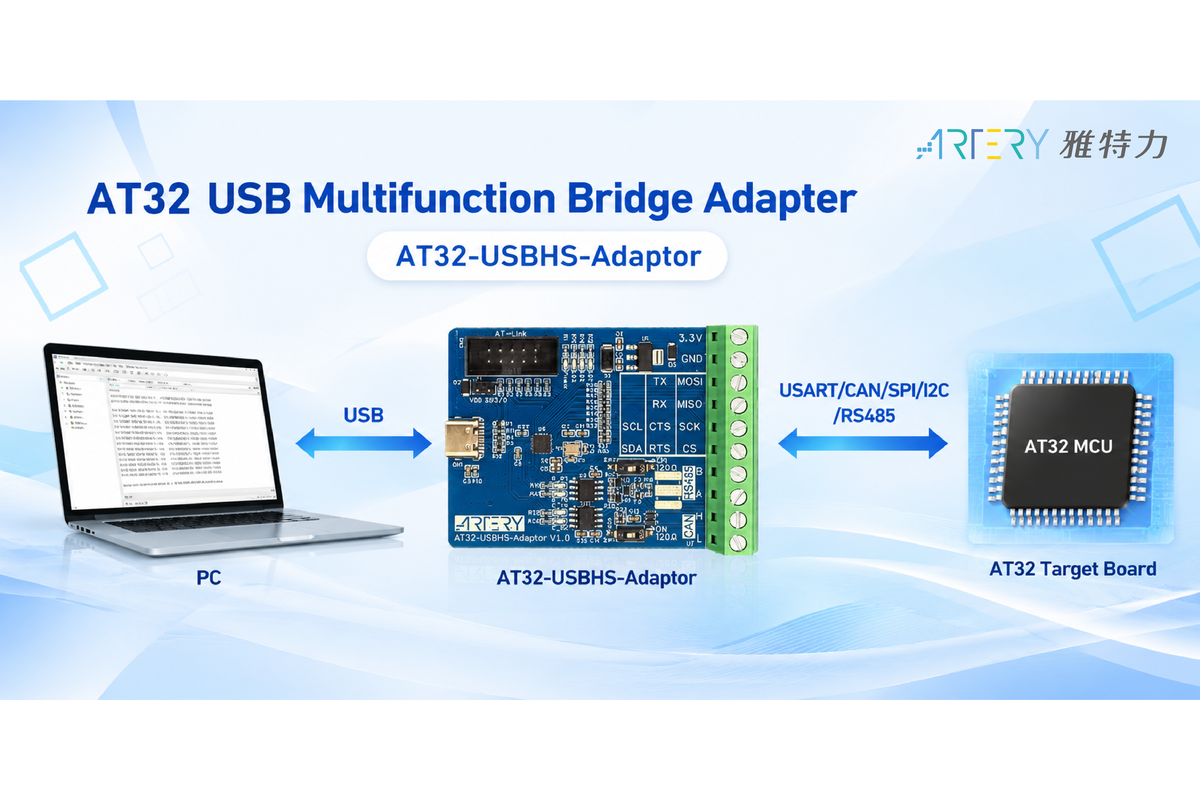
In USB-to-USART applications, the adapter functions as a virtual serial port on the USB side and supports configurable serial communication rates from 1,600 bps to 6 Mbps. Its USB-to-CAN capability encapsulates data according to the CAN protocol and supports 11-bit standard frame IDs and 29-bit extended frame IDs.

Key features of the AT32-USBHS-Adaptor include support for UART, CAN, SPI, I2C and RS485; peripheral selection during program initialization or dynamically through SETUP requests on the USB control endpoint or USB HID commands; adjustment of serial communication rates or frequencies through the SET_LINE_CODING command; USB power with an external 3.3 V / 350 mA output; and onboard LED indicators for operating status.
For hardware setup, developers need the adapter board and a USB cable. Artery provides example projects based on Keil v5; developers using other compilation environments can refer to those projects and modify them. After firmware is downloaded and the USB cable is connected, the corresponding virtual COM port can be identified in the PC's Device Manager for communication testing and debugging.